The project
Start with an approved sequence. Write down the receiving requirements for picture, sound, subtitles, and any alternate aspect ratio. The goal is a package whose file names and contents make sense without opening the editing project.
1. Save the approved state
Save the project and a named version of the approved cut. Confirm the active sequence and original-media availability. Clear any temporary Solo, Mute, or visibility states left from troubleshooting.
2. Configure the picture delivery
Choose Export at the top right (Shift-Command-E), then open Delivery specification and choose the intended settings. Check codec, dimensions, frame rate, audio mix inclusion, and caption behavior. Use a meaningful output name that distinguishes master, web, and alternate-format versions.
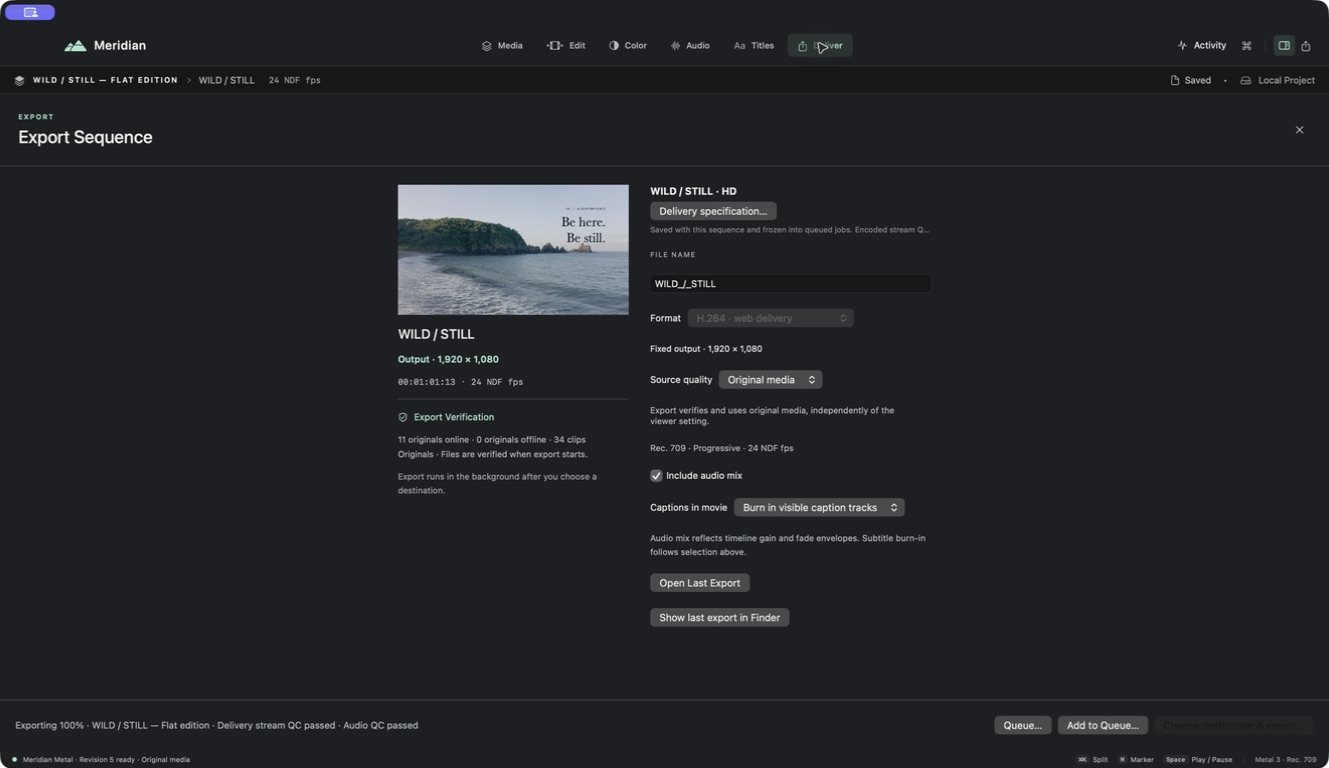
For several outputs, add clearly identified queue jobs and inspect their captured settings. Later changes to the editor should not be assumed to update an already queued specification.
3. Export text and sound separately when required
For subtitle sidecars, select the requested language and format. Export every caption language when that is the agreed package, then inspect the manifest and file names. Remember that subtitle files carry text and timing rather than the exact rendered title style.
For stems, review track and bus assignments and the chosen stem inclusion. Audition the resulting files so that dialogue, music, and effects are where the recipient expects them.
4. Verify the package
Open the delivered movie independently. Check the start, middle, ending, sound, and any burned-in text. Test sidecars in the receiving workflow and check that their timing matches this exact cut.
Review your result
Keep QC reports with the relevant deliveries and add a concise handoff note explaining file purpose and version. Retain the approved project and originals so a later correction can be reproduced.