Open the Mac export sheet
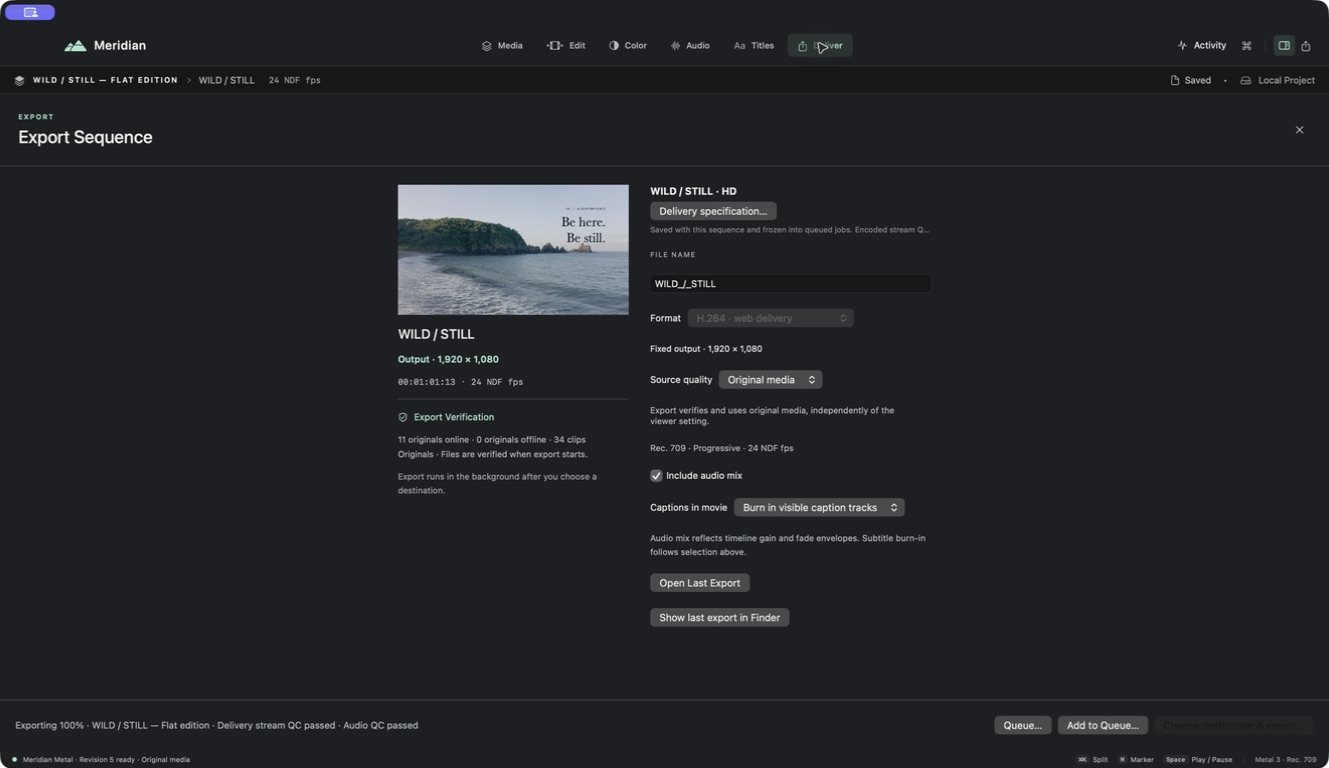
Choose Export or File → Export sequence (⇧⌘E). Check the active sequence name and preview. Delivery specification configures a saved output specification; the ordinary export controls can be constrained by an active specification.
For mobile labels, files, and physical-device checks, use export on iPhone and iPad.
Set format, size, and source quality
The Mac Format list includes H.264 · web delivery, HEVC · compact delivery, ProRes 422 · master, ProRes 4444 · alpha master, and HEVC with alpha. Choose a format the recipient can open. Codec availability and a successful device-specific render should be checked for specialist outputs.
Resolution can Match sequence, use an HD long edge, or use a 4K long edge. Read the actual output dimensions. Exporting a small sequence at a larger size upscales it; it does not add captured detail. A fixed delivery specification can supply its own dimensions and rate.
Choose Source quality independently of playback. Original-media output verifies originals even if the viewer used proxies. Proxy-based output is limited by the verified proxy's resolution and compression.
Check range, audio, and captions
Inspect the saved specification's range and frame rate; avoid a marked or custom range that leaves out the final title. Enable Include audio mix when the output needs sound. Gain, fades, mute/solo, bus routing, and finishing settings can all affect that mix.
Captions in movie selects burn-in or None when a named caption specification does not override it. An active sidecar specification writes a clean movie with caption files, while burn-in permanently draws its chosen language. SRT track → Export SRT… saves a separate reviewed track.
For multiple languages, check each selected variant and its cue text. Keep delivered sidecars with the movie and use matching final filenames. Subtitle text/timing and project typography are different data.
Transparency and color
A transparent sequence needs ProRes 4444 or HEVC alpha settings to preserve alpha in this workflow. Other formats composite transparency over black. Inspect the result against another background in a player or destination that supports alpha.
The current declared preview and delivery output is SDR Rec. 709. Supported HDR source ingest does not establish HDR mastering, a larger output gamut, or the same appearance as Photos. Check highlight detail and color in a representative completed movie.
Render and verify
Choose a writable destination with enough space. Follow progress, cancellation, and any output reports. The job captures its project/settings state, so continuing to edit does not silently update that already captured job.
Use Open Last Export or Show last export in Finder. Review the actual file's beginning, ending, sound, motion, titles, and captions. For repeat jobs and interrupted work, see Export Queue; for failures, see export troubleshooting.