Review before exporting
Play the sequence from beginning to end. Check title spelling, sound balance, black gaps, and the final frame. Save the project and confirm that the original media is online.
Set up delivery
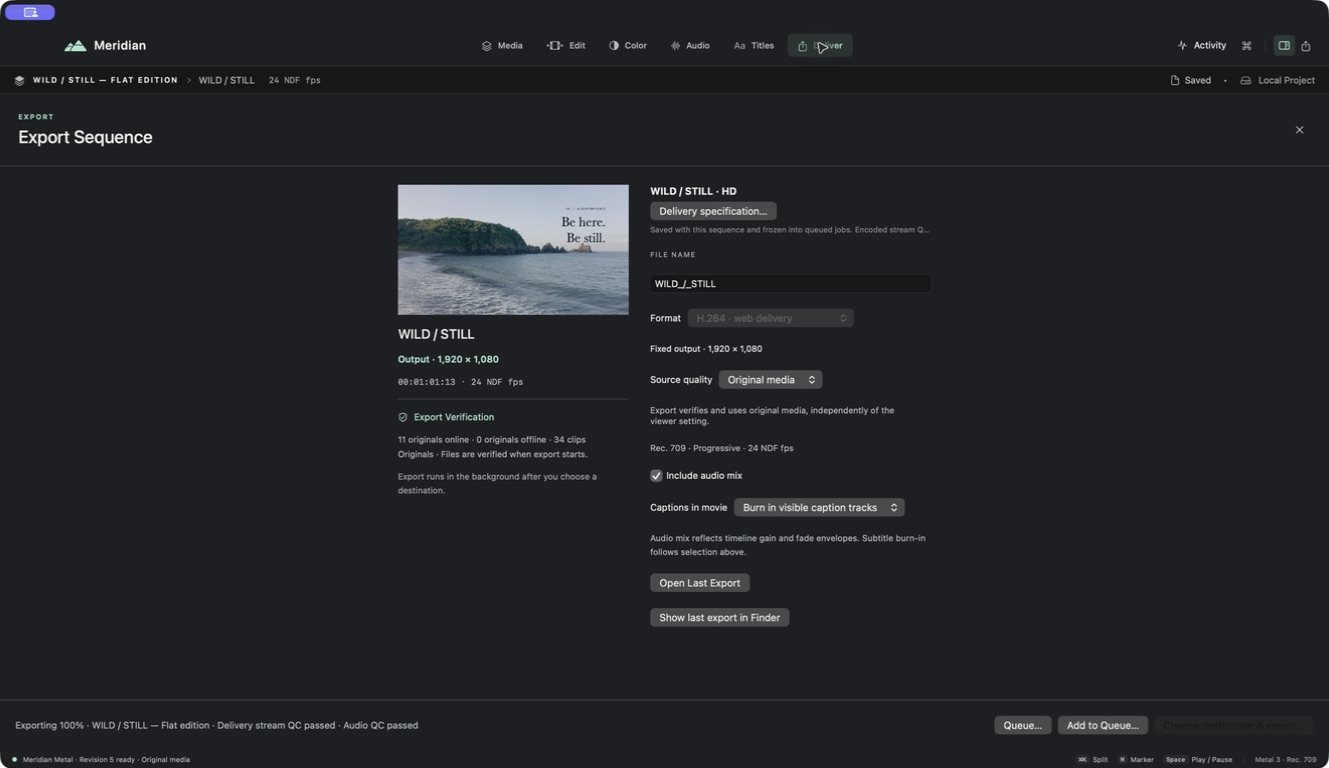
- Choose Export at the top right, or File → Export sequence (
⇧⌘E). - Open Delivery specification and choose a suitable preset. H.264 is a practical starting point for a conventional web video.
- Check dimensions, frame rate, and audio settings against the intended destination.
- Choose source quality. Original-media export verifies originals independently of the viewer’s media choice.
- Select the intended caption behavior and confirm whether the audio mix is included.
- Choose Choose destination & export, select a location, and follow the export progress.
Check the exported file
Use Open Last Export when the job completes. Watch the beginning, at least one transition, a title, a caption, and the ending. Then listen through the full file if it is short. Check that the correct sequence and language were exported.
A successful encode does not decide whether a title is readable or the story works. Your final watch is part of delivery.
If export needs attention
Read the reported error. Missing originals, an unavailable destination, or an incompatible setting need different fixes. Keep the project and source media; do not repeatedly export over your only good copy.
You have completed the whole workflow. Try a detailed tutorial when you are ready for the next project.